
¿Tienes alguna duda
+34 655 641 050 >
 Alfa Romeo
 Audi
Audi
 Bentley
 BMW
BMW
 Cadillac
 Chevrolet
 Chrysler
 Citroen
 Dacia
Dacia
 Daewoo
 DAF
DAF
 Dodge
Dodge
 Ferrari
 Fiat
Fiat
 Ford
Ford
 GMC
GMC
 Honda
Honda
 Hummer
 Hyundai
 Infiniti
 Iveco
Iveco
 Jaguar
 Jeep
Jeep
 Kia
Kia
 Lada
Lada
 Lamborghini
 Lancia
 Land Rover
 MAN
MAN
 Maserati
 Maybach
 Mazda
Mazda
 Mercedes Benz
 MG
MG
 Microcar
 Mini
Mitsubishi
Mini
Mitsubishi
 Multicar
 Nissan
 Opel
Opel
 Peugeot
 Porsche
 Renault
 Rover
Rover
 SAAB
SAAB
 Seat
Seat
 Skoda
Skoda
 Smart
Smart
 SsangYong
 Subaru
 Susuki
 Toyota
 Volkswagen
 Volvo
Volvo
 Anulación de Sistema de Bloqueo en Murcia
 Copia de Llaves Coche en Murcia
 Limpieza de Filtro de Partículas en Murcia
 Pérdida de Llaves de Coches en Murcia
 Reparación de Batería de Coches Híbridos y Eléctricos en Murcia
 Reparación de Centralitas en Murcia
Reparación de Cuadros de Instrumentos Murcia
Reparación de Centralitas en Murcia
Reparación de Cuadros de Instrumentos Murcia
 Reparación de Dirección Asistida Eléctrica en Murcia
 Reparación de Llave de Coches en Murcia
 Reparación Módulo ABS en Murcia
 Reparación Módulo CAS en Murcia
 Reparación Módulo FRM en Murcia
 Reparación Módulo SRS en Murcia
 Reparación UCH Renault y Dacia en Murcia
Reprogramar Centralita en Murcia
Reparación UCH Renault y Dacia en Murcia
Reprogramar Centralita en Murcia
 Tarjetas de Coche en Murcia
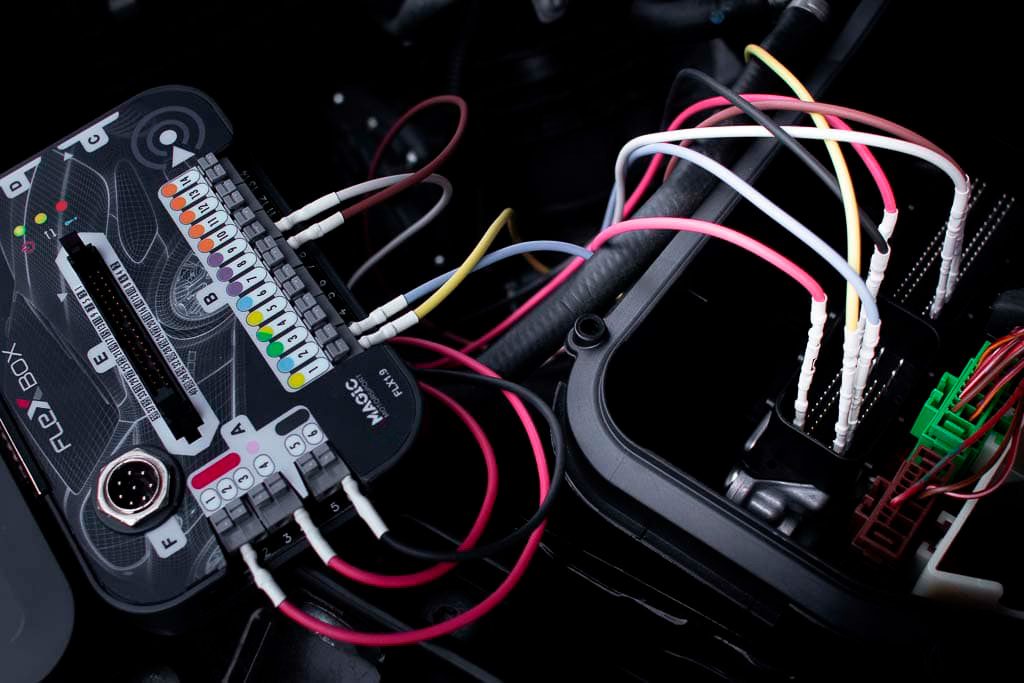
In ECU remapping and cloning, choosing the right connection mode makes the difference between a fast, profitable job… and a massive headache.
Below, you will see what each method offers and, above all, why FLEX —available at Ecumotorstock with 10 FREE welcome files— has become the tool that can literally double your revenue.
| Mode | Description | Advantages | Precautions |
| OBD | Communication through the vehicle's diagnostic port. | The fastest and cleanest. No ECU removal required. Ideal for Stage 1 and quick adjustments. | Limited if the ECU is locked. Does not always allow a full read. |
| Bench | The ECU is removed and connected on the bench with specific wiring (without opening the cover). | Almost total firmware access. Does not compromise the warranty (seals remain intact). | Requires removing the ECU and a stable power supply. |
| Boot | The ECU is opened, and points are soldered or probed directly onto the microcontroller. | 100% access. Allows for deep recoveries and complex cloning. | Physical risk (soldering). Requires more time and advanced skill. |
ECU/TCU Type: Check the database; some units only allow Boot, while many modern ones now accept secure Bench or OBD.
Job Objective:
Simple Remap: OBD.
Cloning/Virginization: Boot or Bench.
Available Time and Acceptable Risk: In a high-volume workshop, minimizing removal saves minutes that turn into profit margins.
Available Tool: A single piece of equipment that covers all three scenarios prevents you from turning away customers.
Always back up the original file and save the checksum.
Disable antivirus/firewalls that might interfere with the software.
Double-check connectors and pins before applying power.
After writing, perform a full diagnostic check and a road test.
Total Coverage: OBD, Bench, and Boot modes for over 25,000 vehicles — cars, motorcycles, trucks, and industrial machinery.
Intelligent Software: Automatically detects the ECU and displays the recommended connection modes with step-by-step diagrams.
Weekly Updates: New protocols added constantly (e.g., support for Scania Bosch EGC4.0 and MT05 2025).
High Productivity: Ultra-fast OBD reading and integrated Bench Unlock option: more cars per day = higher revenue.
Modular: You only pay for the protocol packs you actually use.
Risk-Free: Backup function before every write and automatic recovery in case of power failure.
Ecumotorstock Offer: Purchase your FLEX from us and get 10 professional tuning files for free to start earning from the very first car. Additionally, our team will guide you in choosing the ideal mode for every ECU and provide technical support in Spanish.
The method matters: OBD for speed, Bench for security, and Boot for absolute access.
The tool matters even more: with FLEX, you cover all three without switching equipment.
The partner makes the difference: Ecumotorstock provides 10 free files, expert support, and the real possibility of doubling your revenue through reduced job times and higher average tickets.
Ready to take your workshop to the next level?
Contact us, get your FLEX, and start doubling your revenue today.
{"one"=>"Select 2 or 3 items to compare", "other"=>"{{ count }} of 3 items selected"}
 Clonación de Centralitas
 Alquiler de Centralitas
 Reparación BCM
 Venta de Centralitas
 Audi
Audi
 Lexus
Lexus
Leave a comment