
Any questions?
+34 655 641 050 >
 Alfa Romeo
 Audi
Audi
 Bentley
 BMW
BMW
 Cadillac
 Chevrolet
 Chrysler
 Citroen
 Dacia
Dacia
 Daewoo
 DAF
DAF
 Dodge
Dodge
 Ferrari
 Fiat
Fiat
 Ford
Ford
 GMC
GMC
 Honda
Honda
 Hummer
 Hyundai
 Infiniti
 Iveco
Iveco
 Jaguar
 Jeep
Jeep
 Kia
Kia
 Lada
Lada
 Lamborghini
 Lancia
 Land Rover
 MAN
MAN
 Maserati
 Maybach
 Mazda
Mazda
 Mercedes Benz
 MG
MG
 Microcar
 Mini
Mitsubishi
Mini
Mitsubishi
 Multicar
 Nissan
 Opel
Opel
 Peugeot
 Porsche
 Renault
 Rover
Rover
 SAAB
SAAB
 Seat
Seat
 Skoda
Skoda
 Smart
Smart
 SsangYong
 Subaru
 Susuki
 Toyota
 Volkswagen
 Volvo
Volvo
 Immobiliser deactivation in Murcia
 Car key copying in Murcia
 Particulate filter cleaning in Murcia
 Lost car keys in Murcia
 Hybrid and electric car battery repair in Murcia
 ECU repair in Murcia
Instrument cluster repair in Murcia
ECU repair in Murcia
Instrument cluster repair in Murcia
 Electric power steering repair in Murcia
 Car key repair in Murcia
 ABS module repair in Murcia
 CAS module repair in Murcia
 FRM module repair in Murcia
 SRS module repair in Murcia
 Renault and Dacia UCH repair in Murcia
ECU remapping in Murcia
Renault and Dacia UCH repair in Murcia
ECU remapping in Murcia
 Car key cards in Murcia
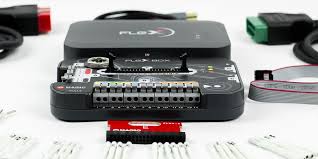
Choosing the correct programming mode with Flex is a key decision for any automotive electronics professional. Each mode—OBD, Bench, or Boot—has specific advantages, risks, and applications. In this article, we explain the differences, when to use each one, and how to get the most out of your Flex tool without putting ECUs at risk.
Flex is a professional tool by Magicmotorsport designed for reading, modifying, and writing ECUs (Engine Control Units) and TCUs (Transmission Control Units). It allows you to work with a wide range of vehicles and protocols, from simple remapping to advanced cloning.
The programming mode you choose directly affects the time required, the level of risk, and the type of intervention you can perform. Therefore, understanding each option is essential before connecting your device.
How it works:
OBD (On-Board Diagnostics) programming is the simplest and most accessible method. It is performed through the vehicle's diagnostic port, usually without removing the ECU. Flex connects directly via an OBD cable, allowing for quick software reading and writing.
Advantages of OBD mode:
No need to open or remove the ECU.
Lower risk of damage.
Ideal for quick jobs like remapping or simple adjustments.
Limitations:
Not all ECUs allow full access via OBD.
It does not always allow for full backups or advanced modifications.
How it differs from OBD:
Bench mode allows access to the ECU by connecting directly to its external pins without needing to open the unit. While the ECU must be removed from the vehicle, there is no need to interfere with the internal circuit board.
Advantages over OBD:
Provides deeper access to the ECU.
Compatible with more models and protected versions.
Ability to clone and make full memory backups.
Disadvantages:
Requires removing the control unit.
Requires greater technical knowledge and equipment (power supply, specific cables, etc.).
What does "Boot mode" mean?
Boot mode is the most advanced method, used when the ECU cannot be accessed via OBD or Bench. In this case, it is necessary to open the ECU and make direct contact with specific points on the internal electronic board, forcing the unit to start in "bootloader" mode.
Advantages:
Full access even to protected or "bricked" (damaged) ECUs.
Ability to recover locked control units.
Disadvantages:
Highly invasive.
Higher risk of damage if not performed correctly.
Requires expertise in electronics, soldering, and the use of technical schematics.
| Mode | Difficulty | ECU Removal? | Access Level | Technical Risk |
| OBD | Low | No | Partial | Very Low |
| Bench | Medium | Yes | High | Medium |
| Boot | High | Yes (+ Opening) | Full | High |
Mechanics or Beginners: OBD mode is ideal—fast, safe, and no disassembly required.
Intermediate Electronic Technicians: Bench mode offers more control and access without the risks of Boot mode.
Experts or Advanced Repairers: Boot mode is essential for complex tasks, ECU recovery, and deep cloning.
Flex is an extremely powerful tool, but its effectiveness depends on choosing the right programming mode for each situation. Whether you are looking for speed, full access, or resolving complex faults, mastering OBD, Bench, and Boot will set your work apart.
At Ecumotorstock, we guide you step-by-step with personalized phone support, so you can work safely in any mode. Regardless of your technical level, our team is here to support you every step of the way to ensure you never take unnecessary risks.
{"one"=>"Select 2 or 3 items to compare", "other"=>"{{ count }} of 3 items selected"}
 ECU cloning
 ECU rental
 BCM repair
 ECU sales
 Audi
Audi
 Lexus
Lexus
Leave a comment